Opening Other Calendars in Outlook for Mac
 Print
Print Email
EmailInstructions on opening calendars that other users have shared with you in Outlook for Mac.
- Open Outlook.
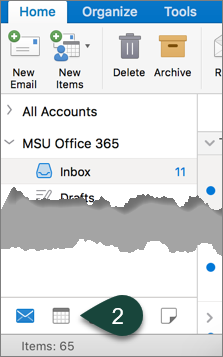
- Select the Calendar Icon.
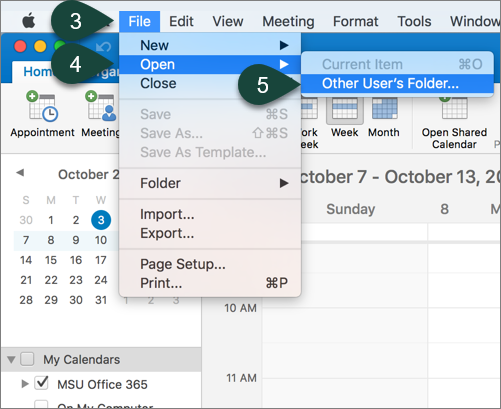
- Select File.
- Select Open.
- Select Other User's Folder.
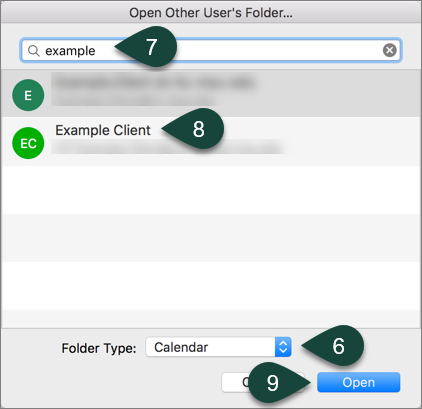
- Select Calendar from the folder type drop-down menu.
- Enter the Title of Calendar in the search box.
- Select the Calendar from the list.
- Select Open.
Did you find this article useful?
You Might Also Be Interested In
-
Pandas’ popularity ‘umbrella’ not protecting neighbors
Published on January 4, 2021
-
BIOLOGICAL CONSERVATION - The hidden risk of using umbrella species as conservation surrogates
Published on December 3, 2020
-
MSU named Top 10 agriculture and forestry college in new report
Published on March 23, 2021
-
Student-led bird banding innovation spearheads continuation of data collection despite COVID-19
Published on March 16, 2021
-
Creating innovative models to assess spread, possible management of deadly chronic wasting disease
Published on February 1, 2021
-
Improving the health of Michigan’s fishes
Published on February 1, 2021